CA Digital Programs and Experiance Library
Overview: To support the creation of digital programs, head office staff need to be able to create new experiences with all the relevant details.
Role: UX researcher, UX/UI designer, Project manager
Toolkit: Adobe XD, Adobe CC, Confluence, Jira, Pencil and paper, Agile environment
Experience Management - Head Office Staff

Experience Management - Field Staff
To support the creation of digital programs, field staff need to be able to create new experiences with all the relevant details.

Digital Programming
The Digital Programming project will allow Educators to curate/collate their program digitally. Prototypes are optimised for tablets, as they are intended solely for use by field staff.

Experience Library
To support the creation of digital programs, head office staff and field staff need to be able to create new experiences with all the relevant details. Prototypes are optimised for tablets, as they are intended solely for use by field staff.
UX Research
Background
To support the creation of digital programs, head office staff and field staff need to be able to create new experiences with all the relevant details.
Research Goals
We want to study how field staff and the head office create weekly activity programs and experiences. This will help us understand their current manual process and how we can digitise it for a more streamlined and efficient workflow.
Current setup
Due to company privacy policies, I am unable to share all of my research.
Competitive Analysis
The approach to start with competitive analysis laid the framework to better understand who my direct competitors were in the Childcare industry and what their strengths and weaknesses are. I could quickly see a gap in the market that our client offerings could fill.
*Due to company privacy policies, I am unable to share all of my research.
Research plan + Interviews
The interview process starts with creating a research plan. This outlines 7 key components:
Project background/problem
Research goals
Research Objectives
Research Questions
Methodologies
Hypothesis
Timeline
Research objectives
Determine how consumers make insurance purchasing decisions
Understand how users navigate competitor websites
Understand the visual aesthetic consumers are looking for
Learn what detractors stop consumers from converting into a sale
One-one Interviews
Most of the interviews took place via FaceTime or Zoom. This process took a week to solicit the right participants, schedule interviews, conduct interviews, and synthesize all the information for my research findings documentation.
*Due to company privacy policies, I am unable to share all of my research.
Age: 32
Gender: Female
Occupation: Service Educator
– Service weekly program creator
– Maintain experiences
– Relays on the Regional Manager to approve her programs and experiences
– Whole work is done manually and uses Powerpoint template
Age: 43
Gender: Female
Occupation: Reginal Manager
– Expert-level experience in creating experiences and approving service programs
– Help service coordinator and educators build their programs and experiences
– She likes to have feathers included in the new digital program and experienced builder.
Age: 40
Gender: Female
Occupation: Service Cordinator
– Create weekly activity programs
– Manage and update experiences
Would like to have a setup page that can manage categories
– Please optimize for tablet use, as all field staff use tablets.
– Overall annoyed at all ends of the process!
User Persona 1
Emily Wilson
Age: 34
Location: Melbourne, VIC, Australia
Occupation: Afterschool Program Coordinator
Education: Bachelor’s Degree in Education
Technology Comfort Level: Moderate to High
Work Experience: 7 years as an afterschool coordinator, 3 years managing staff
Goals:
- Efficiently manage student attendance, activities, and staff schedules
- Create a safe, engaging, and educational environment for students
- Track and report student progress, behaviour, and engagement
- Improve communication with parents and school staff
Frustrations:
- Current system for tracking student attendance and activities is disjointed, requiring manual updates across different platforms
- Communication between parents, teachers, and coordinators can be slow and difficult to organise
- Limited time during peak hours (before and after school) to manage operations efficiently
- Difficulty in finding quick solutions to problems when parents or students need immediate attention
Technological Needs:
- A centralised platform that integrates scheduling, attendance, and communication tools
- Mobile-friendly interface to make updates during the school day or on-the-go
- Easy access to student records and progress tracking features
- Clear, actionable reports on student participation and engagement
User Persona 2
Mark Thompson
Age: 45
Location: Melbourne, VIC, Australia
Occupation: Regional Program Manager (for before/afterschool programs)
Education: Master’s Degree in Educational Leadership
Technology Comfort Level: High
Work Experience: 12 years in educational program management, 5 years in regional management
Goals:
- Oversee the operational efficiency of multiple school locations
- Monitor and improve the quality of the before and afterschool programs
- Provide data-driven reports to school districts and stakeholders
- Ensure consistency in the quality of programs and compliance with local education standards
- Support coordinators with resources and tools to improve their efficiency
Frustrations:
- Difficulty aggregating data from multiple programs and sites in real-time
- Reporting on program success and areas of improvement requires a lot of manual effort
- The lack of a unified system makes it challenging to ensure consistency across locations
- Limited time and resources to provide on-the-ground support for coordinators
Technological Needs:
- A dashboard with real-time data from all locations to track attendance, student progress, and staff performance
- Reporting tools to generate insights for stakeholders quickly and easily
- A system to monitor and manage schedules, budgets, and staffing across multiple sites
- An easy way to communicate directly with coordinators and address issues quickly
Research Findings

Finding the right angle
Effortless create weekly programs

Timing your freedom
Add experiences and create new experiences for weekly programs

Adding more options
Add new options to streamline and effortless the process
UX Design
Features Roadmap
After a first draft of P1 features, I realised I had to reduce the effort to just as enough features as the Digital Program needed. In the final version, I’ve included extra features such as print pack, settings and search as well as special ones like Create experience during the program creation.
Information Architecture
I’ve built a sitemap considering primary, secondary and tertiary navigation. Firstly, I’ve developed the primary navigation by defining which main actions users might have taken: Dashboard, Experience, Program and Help. Secondly, I’ve explored and expanded each one of those sections.
*Due to company privacy policies, I am unable to share all of my research.
User Flows
Initial user flow:
• Create a new program
• Create a new experience
• Approve program process
The idea here was that for users to be able to actively use the application, they needed to create new programs and head office staff able to approve them.
UI Design
Proposed Solution
*Due to company privacy policies, I am unable to share all of my research.
Experience Management – Field Staff
The below elements make up all aspects of experience management for staff out in the field. This will be available on the Service Admin Portal.
Landing Page
The ‘My Experience Library’ landing page is designed to allow a user easy access to suggest new experiences, review/edit experiences they have already created, browse through the experience library and maintain lists of their favorite experiences.
Experience Creation/Suggestion Process
Users will be able to suggest their own experiences to add to the experience library.
Experience Detail Page
After selecting an experience, a user will want to review the details of that experience before adding it to a program or just purely out of curiosity. This page will detail the relevant experience information.
Experience Summary Page
The Experience Summary page provides a list of all experiences that match a users search criteria and allows a user to access more information on those experiences.
Custom List Summary Page
The Custom List Summary page lists all lists for the user. Through this screen the user can create new lists, manage existing lists or select a list to view more detail on what experiences are in that list.
Custom List Detail Page
The custom list detail page lists all the experiences contained within a selected list. It also suggests new experiences to add to the list.
Event Detail Page
he event detail page provides all the detail on a selected event.
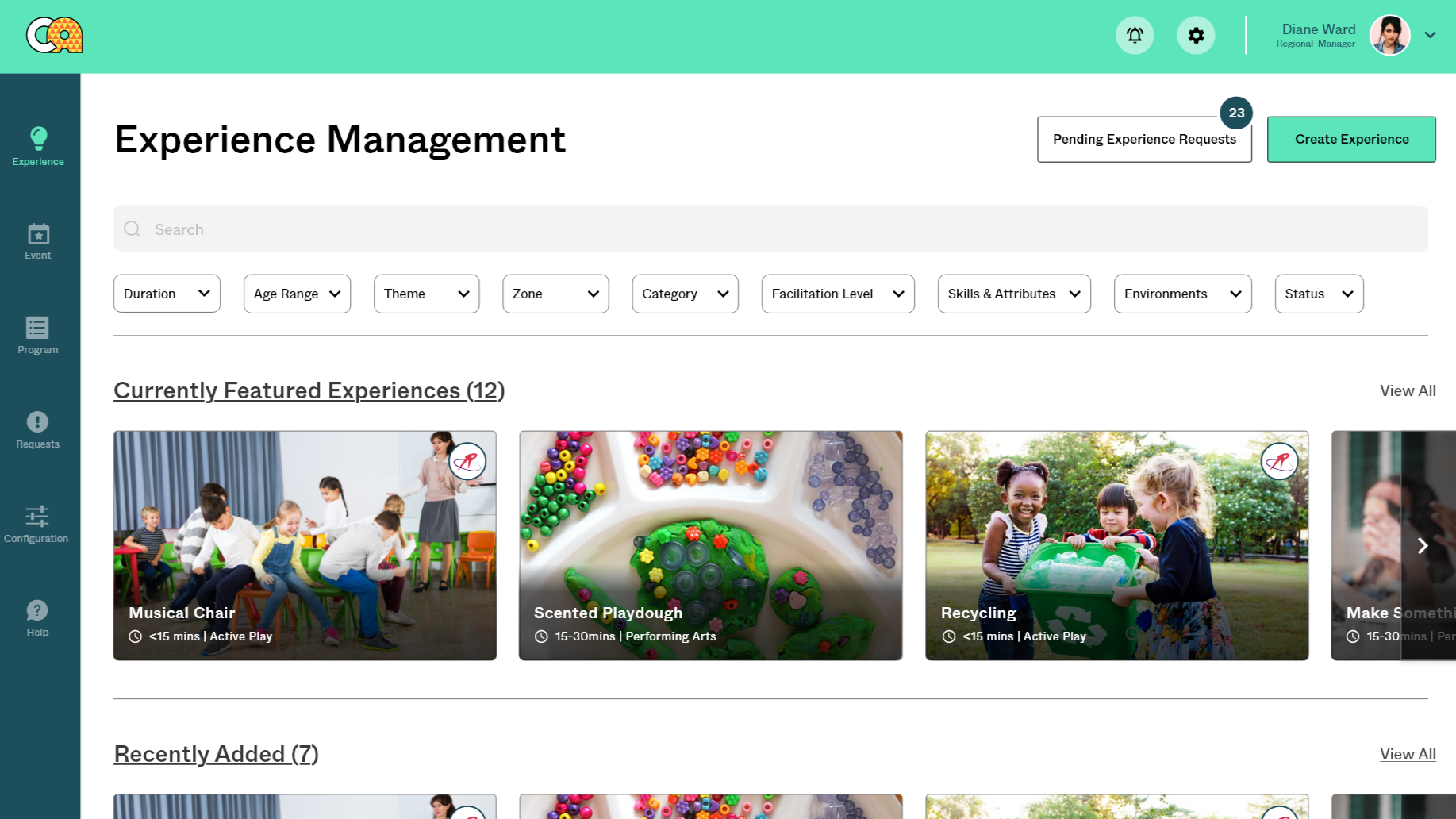
Experience Management – Head Office Staff
The below elements make up all aspects of experience management for head office staff. This will be available on via OCW.
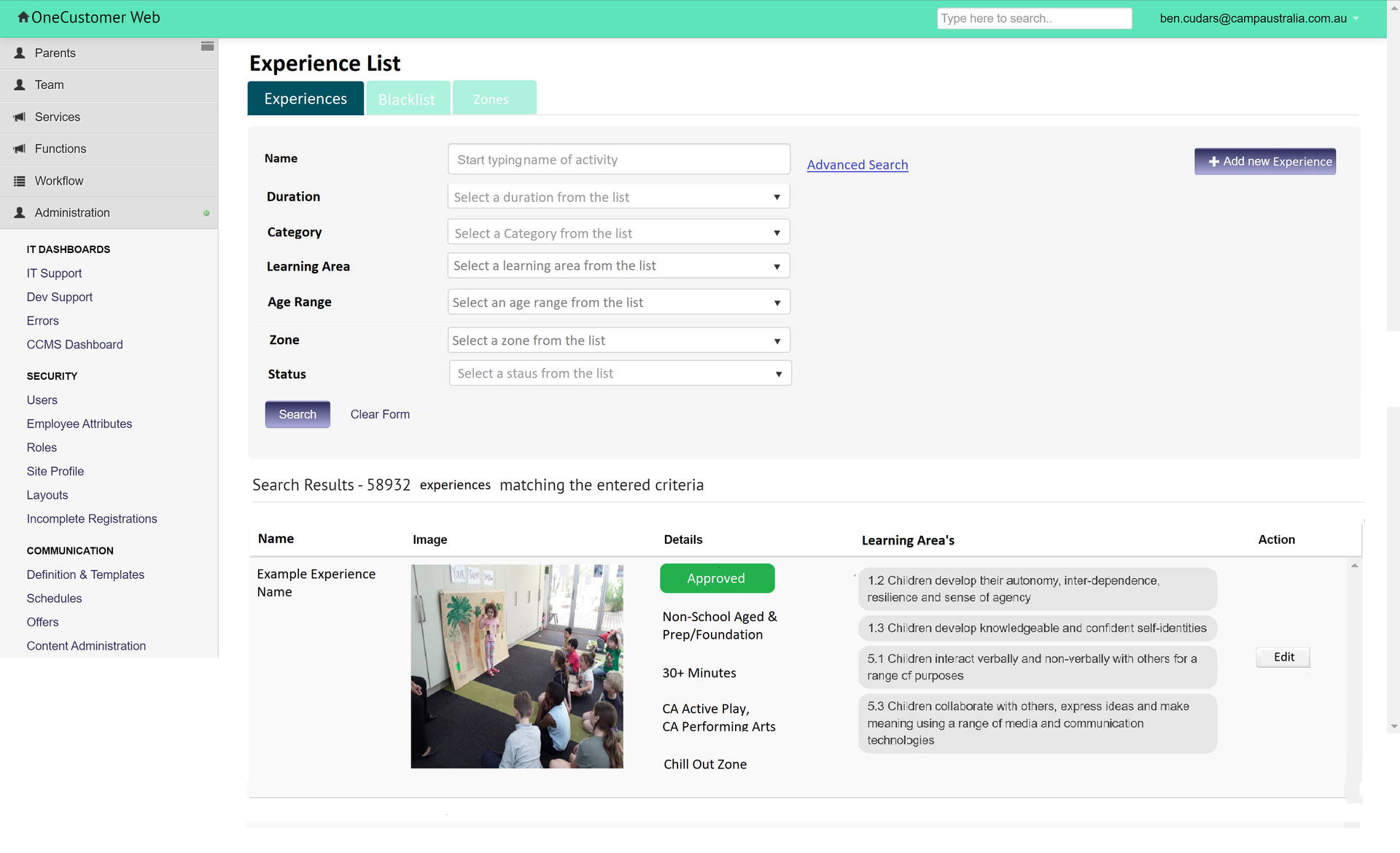
Experience Library Page
The Experience Library page gives the user the ability to search for existing experiences using a number of criteria and provides easy access for a user to edit or create experiences.
Experience Detail Page
The experience detail page allows for the creation/review of all the information associated with any selected experience.
Word Blacklist Page
The Word Blacklist page allows a user to import/export a file containing any words that they do not want to allow in experience creation. This will take form as a file that can be exported, updated and re-uploaded since it could potentially contain hundreds of thousands of words and a front end at that point is not very helpful.
Zone Configuration Page
The Zone Configuration page allows a user to manage the list of zones that are selectable when creating a new experience. Zones are configurable per service.
Theme Configuration Page
The Zone Configuration page allows a user to manage the list of zones that are selectable when creating a new experience.
Skills & Attributes Configuration Page
The Skills & Attributes Configuration page allows a user to manage the list of Skills & Attributes that are selectable when creating/editing experiences.
Learning Outcome Configuration Page
The Learning Outcome configuration page allows a user to manage the list of Learning Outcomes that are selectable when creating or editing an experience.
Event Configuration Page
Camp Australia constantly has various events going on that influence the focus on what we want educators to include in their program. This page will allow head office staff to configure and manage these events themselves.
Experience Approval Process
For any experience that was submitted by a member of Field Staff, they must first be approved by someone from head office before being able to be searched for or used in a program.
Outcome
Overall, the usability test was very satisfactory. The general flow was found to be effective. I made several adjustments aimed at enhancing the flow further.
What Worked
- New dashboard and information presented
- Create new programs and experiences
- New digital download program pack
Benefits
- No more paper based programs
- Easy process
Iterations
High-fidelity key-screens
To enhance the digital program experience, I have updated the process after reinterviewing the users.
*Due to company privacy policies, I am unable to share all of my research.
Just After Release this Feature...
Field users are happy with the current release, and there are no issues or friction.Reduce the time to create weekly programs by 97%. Field users are satisfied with the current release and are experiencing no issues or friction.
Key Takeaways
Challenge
Finalising the features was difficult as it required input from several business units, including Marketing, Field Staff, Head Office Staff, People & Culture, and IT.
When designing an application form, it’s important to consider the detailed aspects that users may need.
Lesson learned
The effort of keeping it simple can make a difference in the final outcome, starting form flowcharts up to the prototype experience
The importance of a well-designed UI library, that is built up using components, variants and frames
Designing in a consistent way can truly help speed up the whole process
Agile Working Environment with Small Sprints
The 3 applications that focus on different users, such as headoffice staff and field staff project has been developed using Agile environment, where tasks are systematically divided into smaller, manageable sprints. This approach facilitates iterative progress, regular feedback, and the flexibility to adapt to changing requirements, ensuring that the project remains aligned with stakeholder goals. Each sprint focuses on specific objectives, enabling the team to deliver functional increments and continually refine our strategies based on insights gained throughout the process.