RMC Could Mobile Optimisation
Overview: The Remote Management Console (RMC) is a platform used by sales representatives to process ads through 2AdPro, a third-party offshore creative and content design team. Fairfax Media has relied on this system for the past four years to streamline collaboration between sales reps and the offshore team.
Role: UX researcher, UX/UI designer, Project manager, Graphic designer
Toolkit: Figma, Adobe CC, Confluence, Jira, Pencil and paper, Agile environment
UX Research
Current issues
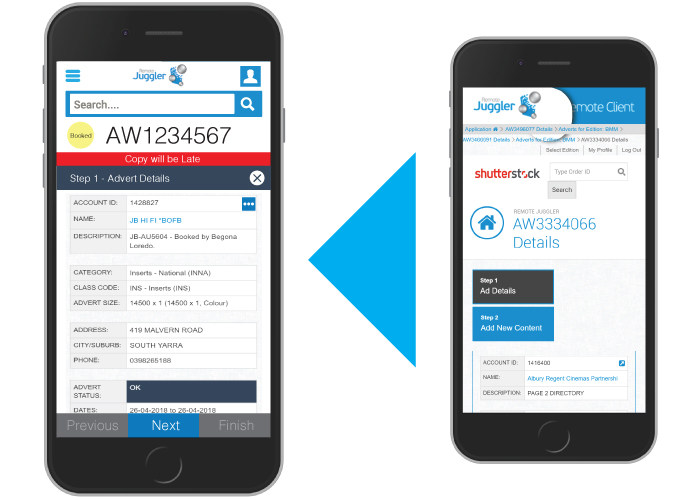
Sales representatives are increasingly mobile, yet the RMC cloud website is not optimized for mobile use, creating significant challenges for on-the-go users. The current mobile experience is not user-friendly, forcing users to rely on desktops or laptops for the best experience. While customers have requested a dedicated mobile app, the development team opted instead to optimize the existing RMC cloud website for mobile devices.
Initial Observations
Despite its limitations, the mobile version of the RMC cloud website is actively used by customers, as highlighted by Google Analytics data. Users frequently express the importance of mobile accessibility, emphasizing its potential to improve workflow efficiency and usability. Optimizing the current website for mobile devices will empower sales reps to work seamlessly from anywhere, enhancing their overall productivity and satisfaction.

Competitive Analysis
*Due to company privacy policies, I am unable to share all of my research.
Research plan + Interviews
The interview process starts with creating a research plan. This outlines 7 key components:
Project background/problem
Research goals
Research Objectives
Research Questions
Methodologies
Hypothesis
Timeline
Research objectives
Determine how consumers make insurance purchasing decisions
Understand how users navigate competitor websites
Understand the visual aesthetic consumers are looking for
Learn what detractors stop consumers from converting into a sale
One-one Interviews
I have interviewed current users from various age groups to gather information about their daily tasks and how they use the current RMC cloud website to address those tasks. The goal is to identify the most commonly used features and gather new ideas for improving the RMC user experience, allowing customers to complete their daily tasks more efficiently.
*Due to company privacy policies, I am unable to share all of my research.
Age: 28
Gender: Male
Occupation: Sales Representative
Q: Can you tell me about your experience using the Remote Management Console (RMC) on mobile?
Sales Representative: “Well, the website isn’t optimized for mobile, so I find it really difficult to use on my phone. The layout doesn’t adjust well to the small screen, and I often have to zoom in and out to see everything. It’s frustrating when I’m trying to respond to a client or make quick updates while on the go.”
Response: It seems like the lack of mobile optimization is creating significant usability issues, especially when you need to quickly interact with the platform during client meetings or while on the move.
Q: How does this affect your workflow?
Sales Representative: “It definitely slows me down. I end up relying on my laptop or desktop to do anything meaningful, which isn’t ideal since I’m often out in the field. When I’m at a client meeting or traveling, I just can’t get as much done. I have to find a spot with a decent Wi-Fi connection and hope my laptop isn’t too bulky to carry around.”
Response: This highlights the challenges of being unable to perform key tasks efficiently from a mobile device, making it harder to stay productive while on the go. It seems like mobility is restricted, leading to delays in completing tasks.
Q: What features do you think would improve your experience on mobile?
Sales Representative: “If the site were more mobile-friendly, that would help. I’d like to see bigger buttons and easier navigation. A lot of the time, I’m just trying to approve or edit an ad, and it’s hard to do that on my phone. Also, the site can be really slow at times, which just adds to the frustration.”
Response: Improving the mobile experience with larger touch targets, better navigation, and faster performance would significantly streamline workflows and reduce frustration for sales reps working from mobile devices.
Age: 43
Gender: Male
Occupation: Sales Manager
Q: What feedback have you received from your team regarding the RMC mobile version?
Sales Manager: “There’s definitely been frustration with the current mobile experience. Our sales reps are increasingly working out of the office or in transit, but the mobile site is not ideal for quick, on-the-go tasks. Some of them mentioned that they prefer to wait until they’re back at a desk to handle anything on the platform, which is a productivity killer.”
Response: It sounds like the lack of mobile optimization is directly impacting your team’s ability to work efficiently when they’re away from the office. If they’re forced to wait until they’re back at a desk, it could lead to delays and missed opportunities.
Q: Do you think the current design impacts their ability to meet deadlines or customer expectations?
Sales Manager: “Yes, absolutely. When they can’t work seamlessly on mobile, they’re losing valuable time. If they have to wait to access the platform from a computer, there’s a chance they might miss an important deadline or a customer request, which isn’t great for business.”
Response: Delays due to mobile limitations seem to be creating a real risk of missing deadlines or customer expectations, which can hurt the business’s reputation and overall performance.
Q: What improvements would make a difference for your team?
Sales Manager: “Improved mobile functionality is key. A more responsive design, with features like larger buttons and easier navigation, would help a lot. Ideally, they should be able to do everything on mobile—whether that’s approving content or making adjustments—without needing a computer.”
Response: A mobile-responsive design with intuitive controls and streamlined functionality could enable your team to manage tasks independently, improving both efficiency and overall satisfaction.
Age: 51
Gender: Female
Occupation: Product Development Team
Q: Can you walk me through your observations about the mobile version of the RMC site?
Product Developer: “From a technical standpoint, the mobile version isn’t as optimized as it should be. The website is a desktop-first design, and although it technically works on mobile, the experience isn’t great. We’ve seen reports from analytics that users still engage with it, but the bounce rate is high, which suggests that users are frustrated with the current mobile experience.”
Response: It’s clear from both a technical and user behavior perspective that the mobile experience isn’t up to par. The high bounce rate suggests users are trying to use the site on mobile but quickly leaving due to frustration with the design.
Q: What kind of issues have you identified that contribute to this frustration?
Product Developer: “There are several factors at play. First, the layout isn’t responsive, so elements overlap or don’t scale well on smaller screens. There’s also the issue of touch optimization. A lot of interactive elements are too small to click on, and the pages can take too long to load on mobile networks. These are the main pain points we need to address.”
Response: The lack of a responsive layout and small, unclickable elements are clear usability barriers on mobile. Additionally, performance issues like slow load times further contribute to a negative experience, making it difficult for users to complete tasks efficiently.
Q: What are your thoughts on optimizing the site versus building a dedicated mobile app?
Product Developer: “While a mobile app could be a good long-term solution, optimizing the existing website makes more sense for now. It’s more cost-effective, and with modern responsive design techniques, we can significantly improve the mobile experience without needing to develop and maintain an entirely new app. We just need to make sure it’s user-centric and mobile-first in its approach.”
Response: It sounds like optimizing the existing site is a practical, cost-effective approach. By focusing on making the website mobile-first, you can improve usability for mobile users without the complexity of building and maintaining a new app.
Examination
Understanding the current user behaviour
Examine a few selected personas to evaluate their use of the current RMC mobile version and identify user experience issues. Additionally, we have used a heat map for a better understanding.
User Persona 1
Emma Williams
Age: 32
Role: Senior Sales Representative
Company: Fairfax Media
Background:
Emma is a seasoned sales representative who spends most of her day in the field, meeting with clients, attending conferences, and working remotely. She relies heavily on her mobile devices to stay connected and productive while managing client accounts and processing advertisements through the RMC system. Despite her mobile-centric work style, she often struggles with using the RMC cloud website on her phone, which affects her ability to perform her tasks efficiently.
Pain Points:
- The RMC website is not optimized for mobile, causing frustration with slow loading times and difficult navigation.
- Small clickable elements make it hard to interact with the site on her phone, leading to wasted time.
- She has to rely on a laptop for more complex tasks, which is inconvenient when on the go.
- The lack of responsiveness and mobile-friendly design makes it harder to complete tasks quickly while meeting clients or traveling.
Goals:
- To be able to perform all necessary tasks—approving ads, making edits, and managing client requests—seamlessly from her mobile device.
- To save time and increase efficiency by reducing the need to switch to a laptop for complex tasks.
- To feel confident that she can meet client expectations and deadlines without needing a desktop.
Tech Usage:
- Primarily uses an iPhone for work-related tasks.
- Prefers apps and websites that are fast, responsive, and easy to navigate on mobile.
- Uses tools like Google Calendar and email apps to stay organized and on track throughout the day.
User Persona 2
David Turner
Age: 45
Role: Sales Manager
Company: Fairfax Media
Background:
David has been with Fairfax Media for over 10 years, working his way up from a junior sales rep to his current management role. He oversees a team of 12 sales representatives, all of whom are regularly on the move, meeting clients, and handling advertising requests remotely. David is responsible for ensuring that the team meets deadlines and delivers high-quality service to clients. He frequently checks on the team’s performance and assists with solving any issues that arise, particularly when it comes to using the RMC system.
Pain Points:
- The current mobile version of RMC slows down the team’s workflow and creates inefficiencies.
- Team members often struggle with mobile accessibility, causing delays in client responses and ad approvals.
- Sales reps are forced to wait until they are back in the office to complete essential tasks, resulting in missed deadlines or extended response times to clients.
- David lacks real-time visibility into how the team is performing when they’re on the go.
Goals:
- To increase team efficiency and productivity by ensuring all sales reps can access and use the RMC system effectively on their mobile devices.
- To ensure that the team can handle time-sensitive tasks quickly and effectively, regardless of location.
- To reduce delays in ad approvals and client communications, maintaining a high level of customer satisfaction.
- To stay informed of the team’s performance in real-time, allowing for proactive problem-solving.
Tech Usage:
- Uses a laptop and smartphone for work management.
- Familiar with team collaboration tools like Slack and project management platforms.
- Frequently communicates via email and messaging apps to stay connected with his team in the field.
Information Architecture
I have started working on wireframing and card sorting based on the gathered information. Once I completed the information architecture, I presented it to the stakeholders for approval.


User Interface Prototyping
Overall, the usability test was very satisfactory. The general flow was found to be effective. I made several adjustments aimed at enhancing the flow further.

Measuring usability
After finishing the initial prototype designs, I tested them with a few customers, personas, and stakeholders. Once the testers and stakeholders were happy with the design prototypes, I started creating a more detailed prototype.

Key Takeaways
Challenge
The key challenge for this project is optimising the existing RMC cloud website for mobile devices while maintaining the full functionality and usability that sales representatives rely on. This involves addressing issues such as:
Responsive Design: Ensuring the website layout adapts smoothly to various screen sizes and mobile devices without sacrificing functionality or performance.
Touch Optimisation: Making interactive elements large enough and user-friendly for mobile touch interfaces to ensure easy navigation and interaction.
Performance: Ensuring fast loading times and smooth performance, particularly on mobile networks, where users may face slower internet speeds.
User Experience (UX): Simplifying the site’s navigation and improving accessibility on mobile, so sales reps can efficiently complete tasks like approving or editing ads while on the go.
Balancing Cost and Time: Optimizing the existing website is more cost-effective than developing a new mobile app, but it requires careful design and technical adjustments to meet user expectations without overburdening the development timeline.
Successfully addressing these challenges will require a balance of technical expertise, user-centric design, and effective project management to deliver a seamless mobile experience.
Lesson learned
As a UI/UX designer and project manager in an agile environment, this project would provide several valuable learning opportunities:
- User-Centered Design: Prioritising user needs and behaviors to improve the mobile experience, while iterating quickly based on feedback.
- Responsive and Adaptive Design: Learning to design for multiple devices and screen sizes, with a mobile-first approach.
- Collaboration: Working closely with stakeholders and cross-functional teams, aligning design with business goals and gathering continuous feedback.
- Balancing Design and Technical Feasibility: Understanding technical constraints and ensuring designs are both user-friendly and feasible.
- Agile Project Management: Managing projects by breaking tasks into sprints, prioritizing tasks, and adapting to changes quickly.
- Testing and Iteration: Using user testing and feedback to iteratively improve the design and validate assumptions.
- Adaptability: Adjusting to changing requirements and shifting business needs, refining designs as necessary.
- Time and Resource Management: Efficiently managing time, resources, and prioritizing key tasks for timely delivery.
- Communication: Developing strong communication skills to present ideas, designs, and findings clearly to both technical and non-technical stakeholders.
Overall, this project helps improve your ability to design user-friendly, mobile-optimized solutions, while working efficiently within an agile environment.